
Phishing Email Examples: What to Look For and How to Protect Your Business
An email lands in your inbox that looks completely normal. It's from Microsoft, or maybe your bank, or a colleague. The logo is right, the language sounds professional, and all it's asking you to do is click a link. One click later, your credentials are compromised, and you may not know that it has happened for days. This is what phishing looks like in practice, and it's one of the most common ways small businesses get breached. Understanding real phishing email examples, and knowing what separates a legitimate message from a fake one, is one of the most practical steps your team can take right now.
What Is a Phishing Email?
A phishing email is a fraudulent message designed to trick you into sharing sensitive information, clicking a malicious link, or downloading a harmful attachment. The goal is typically to steal login credentials, financial details, access to your systems, or install ransomware to encrypt your data and demand payment. Unlike spam, phishing emails are carefully crafted to look legitimate, often impersonating well-known companies, government agencies, or people you actually know. Some are poorly written and easy to catch. While others are polished enough to fool experienced professionals.
Common Phishing Email Examples
Here are five phishing email examples your team is likely to encounter:
Fake Microsoft or IT account alerts
An email arrives saying your Microsoft 365 account is about to be suspended. The logo looks right, the formatting is clean, and there's a button that reads "Verify Your Account Now." The link leads to a page that mimics the Microsoft login screen, where your credentials are captured the moment you type them. This is one of the most common phishing email examples targeting businesses running on Microsoft 365.
"Your invoice is attached" from an unknown vendor
A PDF invoice arrives from a company you don't recognize, or one you deal with occasionally. The attachment contains malware, or the email asks you to log into a portal to view the document. This type of attack is common in accounting and finance teams, where invoice emails are expected and rarely questioned.
CEO or boss impersonation (business email compromise)
An email appears to come from the business owner or a senior manager, asking an employee to urgently transfer funds, purchase gift cards, or share payroll information. The sender's display name matches, but the actual email address is slightly different. These attacks work because employees are often reluctant to question someone above them, especially when the request sounds time-sensitive.
Fake CRA or Canada Post notices
A notice arrives claiming you have a tax refund available, or a package that couldn't be delivered. You're asked to click a link to claim the refund or reschedule delivery, which takes you to a credential-harvesting page. These phishing email examples are especially effective during tax season and around holidays when delivery volumes are high.
Fake login page redirects
A seemingly legitimate email from your bank, cloud provider, or payroll platform includes a link to "update your information" or "confirm a recent transaction." The page looks real but captures your login details the moment you submit them. The best-crafted versions of these phishing email examples are nearly indistinguishable from the real thing on a quick glance.
Red Flags to Spot in Any Phishing Email
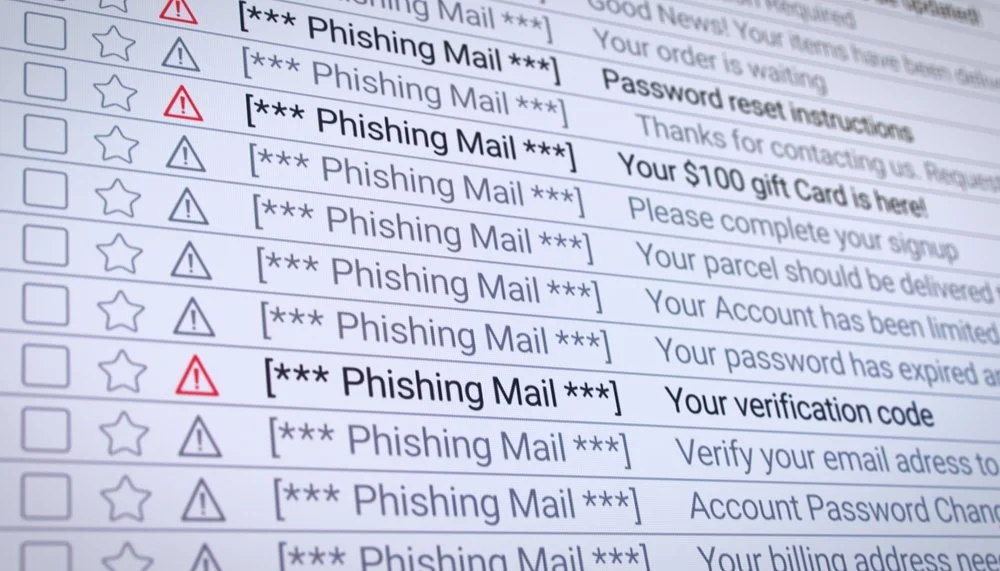
Even well-crafted phishing emails leave traces. Train your team to watch for:
Sender address mismatches: the display name looks right, but the actual email domain is off (for example, support@micros0ft-help.com instead of microsoft.com)
Urgency or threats: language like "Your account will be closed in 24 hours" or "Immediate action required"
Generic greetings: "Dear Customer" or "Dear User" instead of your actual name
Suspicious or mismatched links: hover over a link before clicking to see where it actually points
Unexpected attachments, especially .zip, .exe, or file types you wouldn't normally receive
Branding that is slightly off: wrong colours, awkward fonts, spelling errors, or low-resolution logos
What to Do If You Receive or Click a Phishing Email
If a suspicious email lands in your inbox:
Do not click any links or open any attachments
Report it to your IT team or managed IT provider
Delete it from your inbox and empty your trash
If someone on your team has already clicked:
Disconnect the device from the internet immediately
Notify your IT provider right away so they can assess the scope
Change any passwords that may have been exposed, using a separate, unaffected device
Enable multi-factor authentication on all accounts if it isn't already active
Acting quickly significantly limits the damage. The worst outcome is waiting to see if anything happens.
This is exactly the kind of call Gennix handles for businesses across the Lower Mainland. When something goes wrong, having a local managed IT team who already knows your systems makes a significant difference in how fast you can contain it and get back to normal.
→ Not sure if your team is prepared for an incident? Get in touch with Gennix to find out where you stand.
How Small Businesses Can Reduce Phishing Risk
No email filter catches everything, and no training program creates perfect habits overnight. The most effective approach layers several defences together:
Employee awareness so your team recognizes phishing email examples when they arrive, not after they've clicked
Multi-factor authentication (MFA) on all accounts, so stolen credentials alone are not enough to gain access
Email filtering that flags known malicious senders and scans attachments before they reach the inbox
A clear incident process so employees know exactly who to call and what to do the moment something looks wrong
At Gennix, this is a core part of what we do for businesses across Langley and the Lower Mainland. We help clients configure email filtering, enforce MFA across their Microsoft 365 environments, and put a clear incident response process in place so your team knows exactly who to call and what to do.
→ Ready to put the right layers in place for your business? Talk to Gennix about protecting your team from phishing.
→ Follow Gennix on LinkedIn and Facebook for more cybersecurity tips for small businesses.
Frequently Asked Questions
What is the difference between phishing and spear phishing?
Phishing emails are sent broadly to large numbers of people. Spear phishing is targeted, using specific details about the recipient, such as their name, role, or employer, to make the message more convincing and much harder to detect. Spear phishing attacks are more work for the attacker, but they have a higher success rate.
What should I do if an employee clicks a phishing link?
Disconnect the device from the internet immediately, notify your IT support team, and change any passwords that may have been exposed. Speed matters. Don't wait to see if anything happens.
Can phishing emails bypass spam filters?
Yes. Sophisticated phishing emails are designed to look legitimate enough to pass through standard filters. Filters reduce volume but are not a complete defence on their own. Multi-factor authentication, employee awareness, and a solid network security setup are equally critical layers, especially for small businesses handling sensitive data in industries like healthcare, legal, and manufacturing.
What is ransomware?
It is a type of malware that locks or encrypts a victim’s data, devices, or systems, making them inaccessible until a ransom payment is made.
How do I report a phishing email in Canada?
You can report phishing attempts to the Canadian Anti-Fraud Centre at antifraudcentre.ca. If the email impersonates a specific company, report it directly to that company's fraud or security team as well.
Does Gennix help businesses in my area with phishing protection?
Yes. Gennix provides managed IT services, network security, Microsoft 365 managed services, and business computer support to businesses across Vancouver, Surrey, Langley, Burnaby, Chilliwack, White Rock, Richmond, Coquitlam, Delta, New Westminster, Maple Ridge, and Abbotsford. Phishing protection, including email filtering, MFA setup, and employee awareness, is a core part of what Gennix sets up and maintains for clients throughout the Lower Mainland.